The work
Inventory reconciliation means comparing inventory levels, inbound shipments, product catalog information and CSV report data to work out where the records do not agree.
The friction
The difficult part is repeatedly comparing records across several data sources and identifying the exceptions that actually need attention.
The system
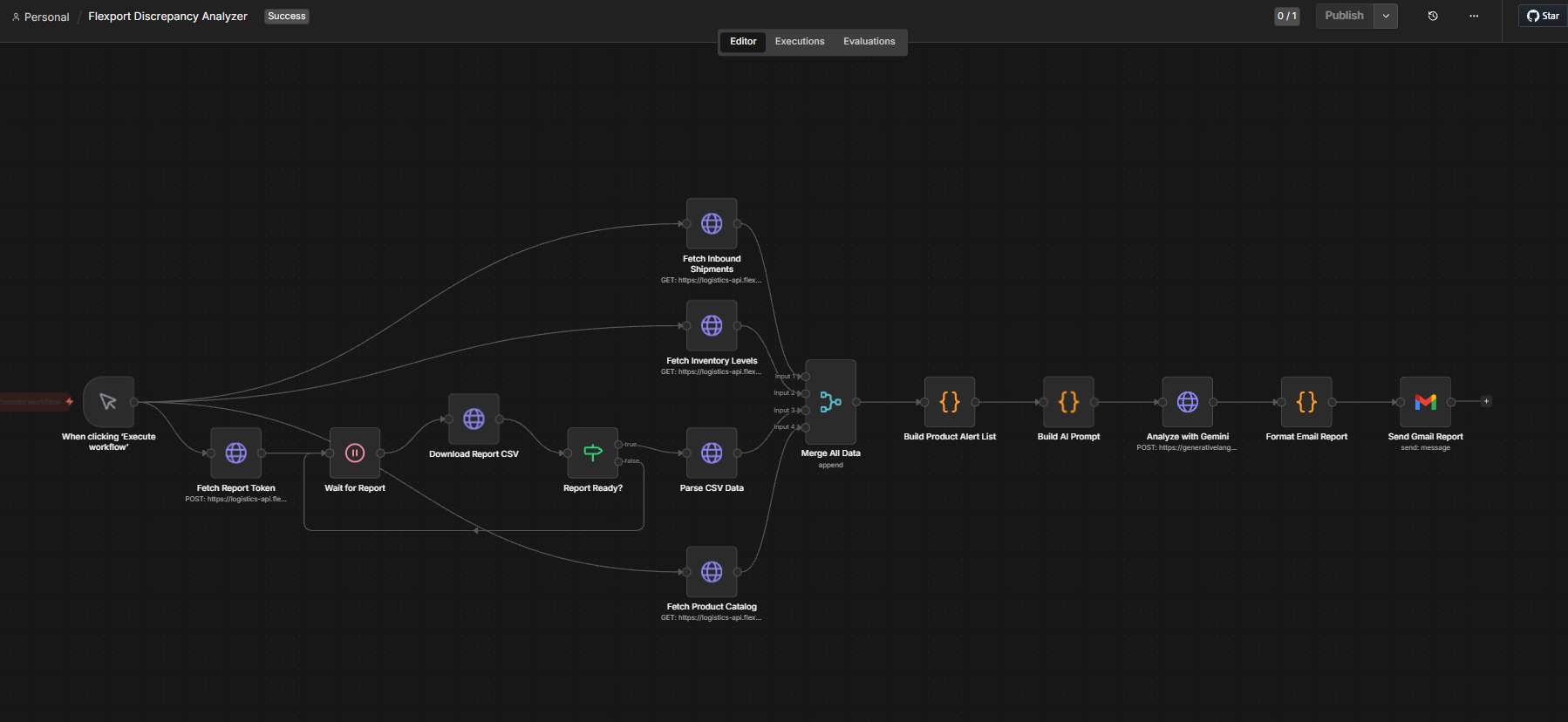
Report retrieval runs first. Three Flexport data sources are then fetched in parallel and merged before anything is analysed.
- Manual Execute
- Fetch Report Token
- Wait for Report
- Report Ready?
- Download Report CSV
- Parse CSV Data
Flexport data, fetched in parallel
- Fetch Inbound Shipments
- Fetch Inventory Levels
- Fetch Product Catalog
- Merge All Data
- Build Product Alert List
- Build AI Prompt
- Analyze with Gemini
- Format Email Report
- Send Gmail Report
What it handles
- Report-token retrieval
- Report readiness checking
- CSV retrieval
- CSV parsing
- Flexport API requests
- Inbound shipment retrieval
- Inventory-level retrieval
- Product-catalog retrieval
- Data merging
- Discrepancy preparation
- Product alert preparation
- AI-assisted analysis
- Formatted report generation
- Gmail delivery
What stays human
The report arrives by email. Someone reads it and decides the operational action.
- Inventory decisions
- Shipment handling
- Product record corrections
- Supply-chain decisions
The principle
The workflow explains the discrepancies. A person decides what to do about them.
Exceptions
These are cases the workflow can meet. It does not correct records on its own.
- Report not ready
- Token retrieval failure
- API failure
- Missing records
- Incomplete SKU mappings
- Malformed CSV data
- Disagreement between data sources
- AI analysis requiring additional review
How it improves the workflow
Instead of manually cross-checking every record, the workflow collects, compares and organises the discrepancies that need attention.
Who it’s for
- E-commerce businesses using Flexport
- Logistics and supply chain teams
- Warehouse and inventory managers
- Operations teams doing manual stock reconciliation
- Businesses shipping internationally