The work
Amazon Ads reports normally need to be downloaded, opened, interpreted, and turned into optimisation recommendations.
The friction
The repetitive part is handling the report files, dealing with different formats, extracting the useful data, flattening the records, reviewing campaign information, and preparing recommendations.
The system
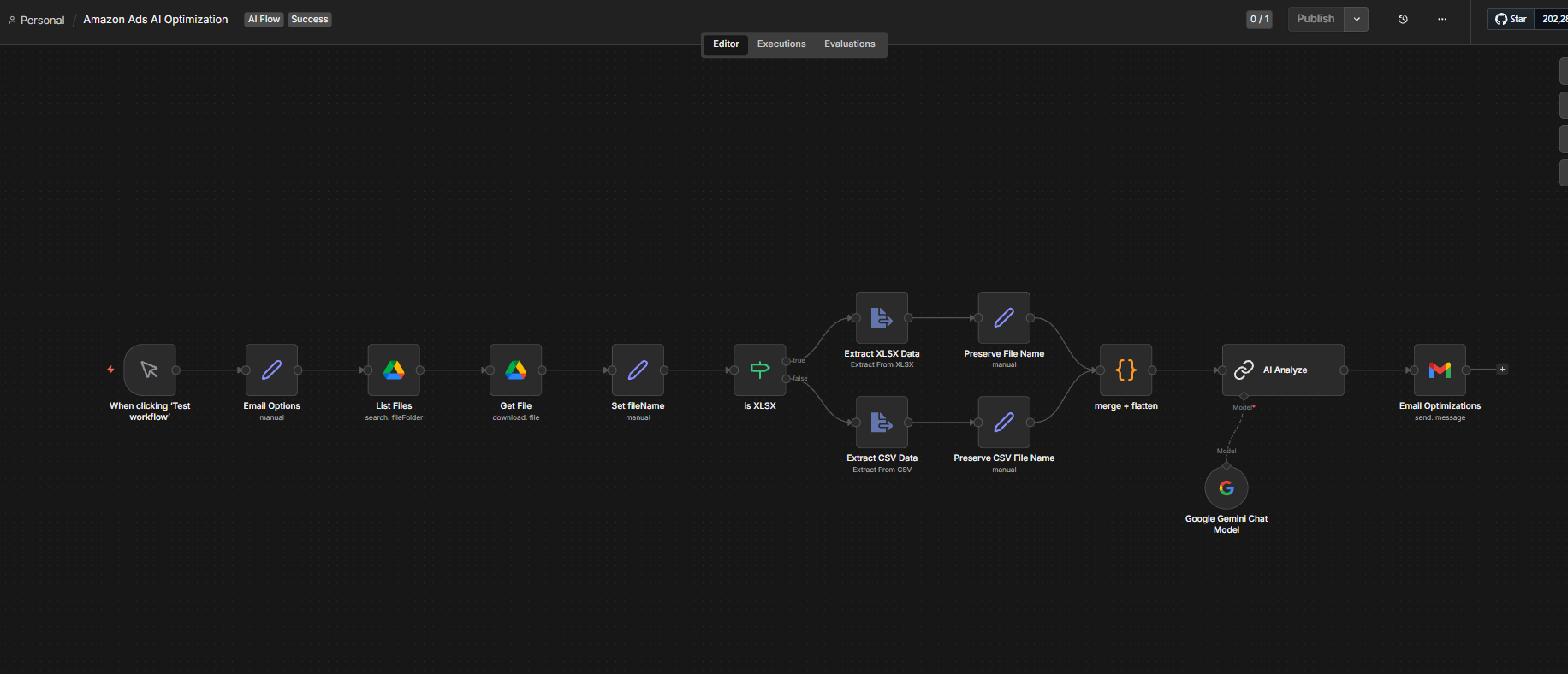
The format check is the fork in the workflow: XLSX and CSV take separate extraction paths, then rejoin before analysis.
- Manual Test Trigger
- Email Options
- List Files in Google Drive
- Get File
- Set File Name
- Is XLSX?
Two extraction paths
- XLSX: Extract XLSX Data, then Preserve File Name
- CSV: Extract CSV Data, then Preserve CSV File Name
- Merge and Flatten
- AI Analyze using Google Gemini
- Email Optimizations
What it handles
- Google Drive file discovery
- File retrieval
- CSV and XLSX format detection
- Report parsing
- File-name preservation
- Data merging
- Flattening
- Gemini analysis
- Email recommendation preparation
What stays human
The workflow ends at an email. Every change to a live campaign is a human decision.
- Reviewing the recommendations
- Deciding which changes are applied
- Judging whether a recommendation fits the account
- All spend decisions
The principle
The system recommends. A person decides what actually changes.
Exceptions
The workflow does not change bids or campaigns. Anything it produces is a recommendation.
- Missing report columns
- Malformed files
- Download failure
- Unsupported file structure
- CSV parsing errors
- XLSX parsing errors
- AI recommendation requiring human review
How it improves the workflow
The system reduces the repetitive work of preparing advertising reports for analysis and turns a report into a structured recommendation that can be reviewed before anything is acted on.
Who it’s for
- Amazon sellers & FBA businesses
- Digital marketing agencies managing ad accounts
- E-commerce brands spending on Amazon PPC
- Teams that review ad reports manually
- Businesses wanting faster, smarter ad decisions