The work
Producing structured social media content involves managing system prompts, managing output schemas, generating the content, sourcing images, preparing review material, organising files and storing the final assets.
The friction
The same coordination work repeats every time a new content package is created.
The system
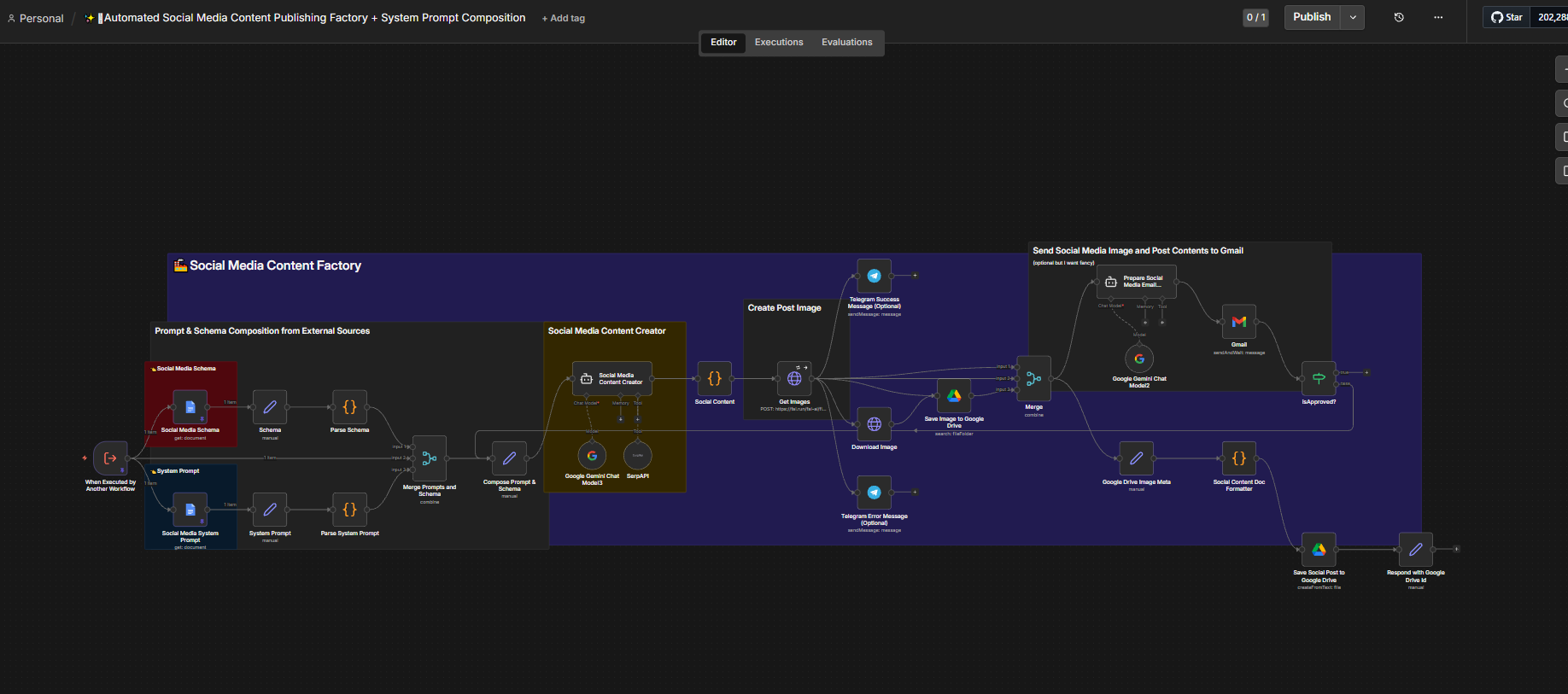
The workflow is called by another workflow and takes a schema and a system prompt as inputs. After generation it splits into a review branch and a storage branch.
- Triggered by Another Workflow
Inputs
- Social Media Schema
- System Prompt
- Parse Schema
- Parse System Prompt
- Merge Prompts and Schema
- Compose Prompt and Schema
- Social Media Content Creator
Uses
- Google Gemini Chat Model
- SerpAPI where configured
- Social Content
- Get Images
- Optional Telegram success or error messages
- Download Image
- Save Image to Google Drive
- Merge
Review and storage branches
- Review: Prepare Social Media Email
- Review: Gmail
- Review: Is Approved?
- Storage: Google Drive Image Metadata
- Storage: Social Content Doc Formatter
- Storage: Save Social Post to Google Drive
- Storage: Respond with Google Drive ID
What it handles
- Prompt loading
- Schema loading
- Schema parsing
- Prompt composition
- AI content generation
- Image retrieval
- Image download
- Google Drive storage
- Gmail review packaging
- Approval flow
- Content-document formatting
- Final Drive asset creation
What stays human
Human approval is part of the workflow before content is treated as approved.
- Approving or rejecting the content package
- Prompt strategy
- Judging content quality
The principle
The factory assembles the package. Approval is still a person's call.
Exceptions
- Invalid schema
- Conflicting prompt instructions
- Weak content output
- Unavailable images
- Image download failure
- Gmail failure
- Drive storage failure
- Approval rejected
How it improves the workflow
It turns prompt composition, content creation, image gathering, review preparation and file organisation into one coordinated content-production workflow.